
Make: review, pricing and alternatives
What is Make? The AI Workflow Orchestrator
When I first encountered Make, it was under its former name, Integromat. It quickly became clear that this wasn't just another integration tool; it was a no-code visual automation platform designed to be the central nervous system for my digital operations. At its core, Make's purpose is elegantly simple: to connect disparate applications and automate tasks that would otherwise consume valuable time. But where it truly shines is in its capacity for complex, multi-step workflows, positioning itself as a robust and often more powerful alternative to platforms like Zapier.
Think of Make as the "digital glue" that holds your tech stack together. Instead of just passing data from one app to another in a linear fashion, Make allows for intricate logic and branching paths. This means I can design automations that truly mirror the complexities of real-world business processes, rather than forcing my processes to fit a simpler tool's limitations. It’s a tool for orchestrating a symphony of apps, making them work together seamlessly without writing a single line of code.
For anyone looking to move beyond basic integrations, Make offers a canvas to build sophisticated automated systems. Whether it’s synchronizing databases, automating CRM updates, or orchestrating multi-step marketing campaigns, Make provides the environment. It empowers users to create what it calls "scenarios" – comprehensive workflows that can involve dozens of steps, conditional logic, and various data transformations, all managed through a highly visual interface.
Key Features: Beyond Simple Integrations
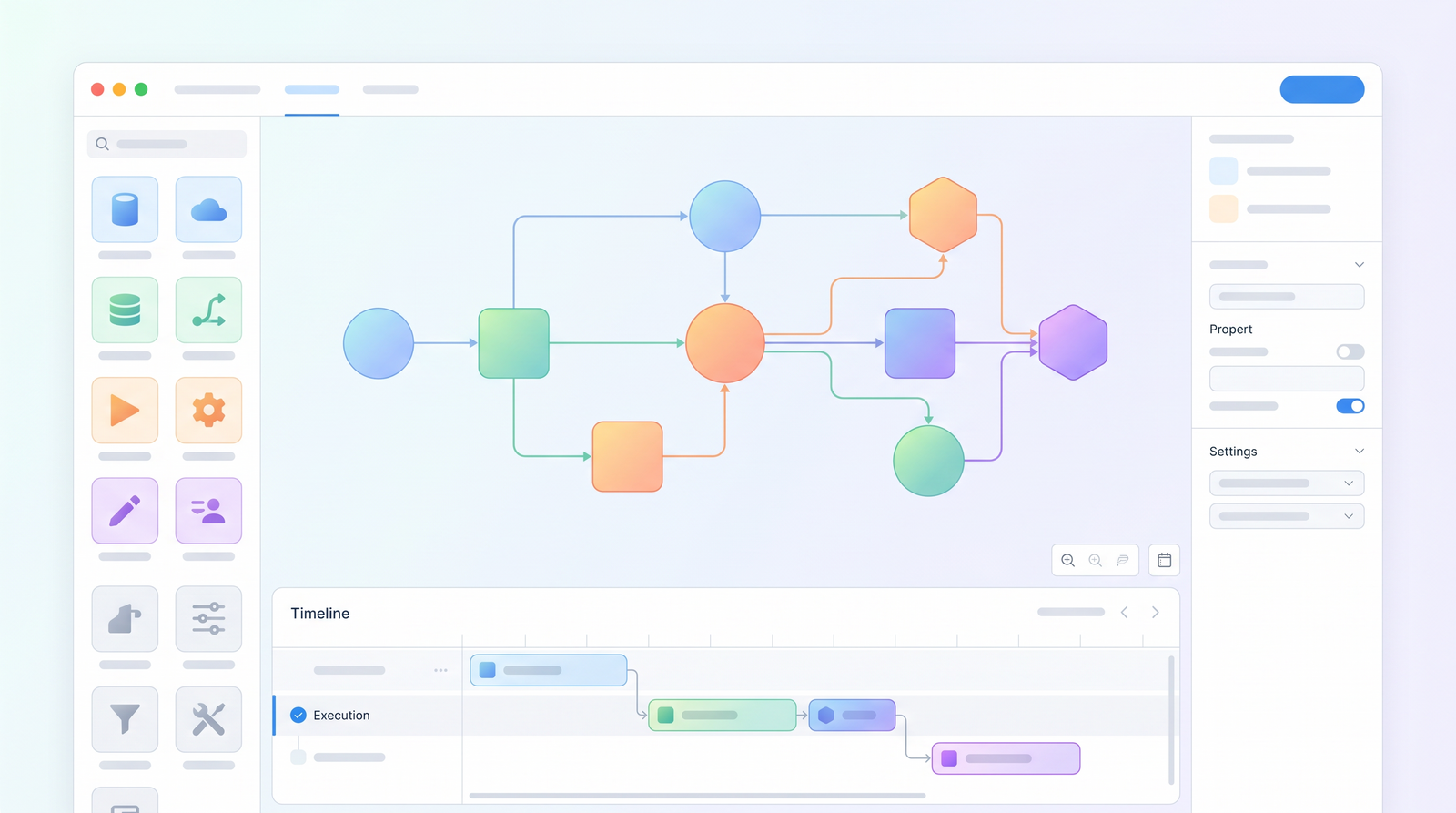
What truly sets Make apart is not just the sheer number of integrations it offers – over 3,000 and counting – but the depth of its features that allow for highly customized and intelligent automations. The first thing you'll notice is its visual scenario builder. This drag-and-drop interface transforms abstract logic into a tangible flowchart, making it much easier to visualize and construct complex processes. Each step in your automation is represented by a "module," and connecting them is as simple as drawing a line.
Beyond the basic connections, Make equips you with advanced logic tools that are essential for real-world business scenarios. Routers, for instance, allow a single input to branch into multiple different paths based on specific conditions, enabling multi-branching workflows. Filters let you define precise criteria for data to pass through, ensuring that only relevant information proceeds. And critically, error handlers provide a safety net, allowing you to define what happens when a step fails, preventing your entire workflow from crashing and ensuring robustness.
I also appreciate the flexibility in scheduling. Scenarios can be set to run at fixed intervals, or they can trigger instantly via webhooks, which is incredibly useful for real-time data processing. When things go wrong, or even just to monitor performance, the detailed execution logs are invaluable. Every single run of a scenario is recorded, showing the data flow at each step, which makes troubleshooting a significantly less painful experience. Furthermore, Make includes built-in data stores, offering a way to persist and reuse information across different scenarios, adding another layer of sophistication to your automations.

How Make Works: Building Your First Scenario
Diving into Make's ecosystem requires understanding a few key terms. Your automated workflow is called a scenario. Within each scenario, you have individual steps, which Make refers to as modules. These modules are where the magic happens, representing actions within an app – a third-party service like Gmail, Airtable, or Slack, or even built-in Make functions like data manipulation or flow control. Every time a module executes, it consumes credits, which are the currency of Make's pricing model.
Building your first scenario typically starts with a trigger module. This is the event that kicks off your automation. For example, it could be a new row added to a Google Sheet, a new email arriving in your inbox, or a webhook receiving data from another service. Once the trigger fires, data flows into the next module. You simply drag and drop modules onto your canvas and connect them with lines, creating a visual representation of your process.
Let's say I want to automate a process where a new Google Form submission creates a record in my CRM and then notifies my team on Slack. I'd start with a Google Forms "Watch New Responses" module as my trigger. Then, I'd connect it to a CRM module (e.g., Salesforce or HubSpot) to "Create a Record," mapping the form data to the CRM fields. Finally, I'd link that to a Slack module to "Send a Message," perhaps including a link to the new CRM record. Throughout this process, Make's intuitive interface allows me to configure each module, specify conditions with filters, or even branch the workflow with routers, all without writing any code. It’s a powerful visual language that, once learned, makes building complex automations surprisingly accessible.
Pricing & Plans: Understanding the Credit System
Make's pricing structure is one of the areas that can initially cause a bit of head-scratching for new users, as it operates on a credit-based system. Unlike some competitors that charge per task, Make charges per module execution. This means that every time a module in your scenario runs, it consumes credits. Simple modules might cost one credit, while more complex operations could consume more. This model can be incredibly cost-effective for complex, multi-step workflows, especially when compared to platforms that charge per 'Zap' or 'task' regardless of the complexity within.
My experience has shown that while the initial learning curve for understanding credit consumption exists, it quickly becomes intuitive. You'll find that the more modules your scenario has, the more credits it will use per run. This encourages efficient workflow design. Make offers various plans, typically ranging from around $9 to $34.12 per month (when paid annually), each offering a different allocation of operations (credits) and other features like increased execution frequency or priority support. There's also a free plan, which is excellent for testing the waters and building smaller, less frequent automations.
For individual users or small teams with moderate automation needs, the lower-tier plans provide ample credits. However, for businesses orchestrating high-volume data flows or complex, frequently running automations, scaling up to higher-tier plans offers a significantly better value proposition than many alternatives. It's crucial to estimate your anticipated module executions to choose the most economical plan, but generally, for those with complex needs, Make often proves to be more budget-friendly in the long run.
| Plan | Price (approx. monthly, paid annually) | Best for |
|---|---|---|
| Free | $0 | Testing, small personal automations, learning the platform |
| Core | $9 | Individuals, small teams with basic automation needs |
| Pro | $16 | Growing teams, moderate automation volume, more frequent runs |
| Teams | $29 | Larger teams, complex workflows, higher operation limits |
| Enterprise | Custom | Large organizations, specific needs, dedicated support |

Pros of Using Make: Power and Flexibility
What I keep coming back to with Make is its sheer power and unparalleled flexibility. It’s not just a tool; it’s an automation ecosystem that truly allows you to build virtually anything you can imagine. The ability to handle complex, multi-branching workflows with ease is a standout feature. Where other platforms might force you into linear paths, Make's routers and filters give you the freedom to create intricate decision trees and parallel processes, reflecting the true complexity of business logic.
I've also been consistently impressed by Make's advanced data manipulation capabilities. It's much more than a simple data passer; it’s a fully-featured data transformation engine. You can format, parse, aggregate, and iterate over data within your scenarios, ensuring that information is always in the correct structure for its destination. This is a game-changer for maintaining data integrity across different systems.
The extensive library of over 3,000 integrations means that almost any app in my tech stack can be connected, making it a truly universal connector. Furthermore, for all its complexity, the visual builder maintains a surprising level of clarity. When dealing with dozens of modules and multiple branches, seeing the entire workflow laid out visually makes debugging and understanding the logic significantly easier than sifting through lines of code or disconnected steps. Finally, for the level of sophistication it offers, Make often proves to be remarkably cost-effective, especially for users who require high volumes of operations or intricate automations.
Cons & Challenges: The Learning Curve and UI
While Make offers immense power, it's not without its challenges, and I'd be remiss not to address them honestly. The most frequently cited hurdle, and one I certainly experienced, is the steep learning curve. While marketed as no-code, mastering Make's advanced features, understanding its terminology, and designing efficient scenarios can take a significant investment of time – some estimate around 3-4 hours just to get comfortable with truly complex builds. It's a powerful tool, but that power comes with a certain level of conceptual complexity that requires patience to unpack.
The user interface, while visual, can also feel a bit overwhelming or "goofy looking" at first, as one user put it. For beginners, the sheer number of options within each module and the density of connections on the canvas can be intimidating. It's not as immediately intuitive as some simpler alternatives, and finding specific modules or making revisions to existing workflows can sometimes be less straightforward than I'd like, particularly when dealing with very large scenarios where module visibility can become an issue.
Another point of initial confusion for many, myself included, is the credit system. While I now see its value, understanding how credits are consumed per module execution, and how that translates to actual cost, isn't always immediately obvious. It requires a mental shift from a 'per task' or 'per Zap' model. This can make budgeting and estimating usage a bit of a guesswork initially, though Make does provide tools to monitor consumption over time. These aren't deal-breakers, but they are important considerations for anyone approaching Make for the first time.
Who is Make Best For? Ideal Use Cases
Based on my hands-on experience, Make isn't for everyone, but for a specific type of user or business, it's an absolute game-changer. It truly shines for individuals and teams who are comfortable with visual logic and enjoy the process of mapping out intricate systems. If you've ever found yourself drawing flowcharts to explain a process, you're likely a good candidate for Make's visual builder.
It's ideally suited for teams and businesses that require complex, multi-branching automations. Simple, linear tasks can be handled by many tools, but when your workflow involves conditional decisions, parallel processing, or sophisticated data transformations, Make becomes indispensable. I've seen it used effectively by businesses orchestrating multi-step data flows between CRM, marketing automation, project management, and reporting tools, acting as the central hub for their operational data.
Ultimately, Make is best for anyone who has hit the limitations of simpler automation platforms or finds Zapier's pricing prohibitive for their complex, high-volume needs. If you're looking for a powerful Zapier alternative that offers granular control, deep data manipulation capabilities, and a visual interface to manage intricate logic, then Make is definitely worth exploring. It empowers you to build robust, customized solutions that truly fit your unique business processes.
Make vs. Alternatives: Zapier, n8n, and Others
When evaluating Make, it's almost impossible not to compare it to its main rivals, primarily Zapier and n8n. Each platform has its own philosophy for handling complexity. Zapier, for instance, tends to simplify the user experience with a more linear, step-by-step approach, which is great for beginners but can feel restrictive for advanced users. Make, on the other hand, pushes complexity into its UI, offering more clicks, more configuration options, and a more visually interconnected canvas. This allows for far greater flexibility and depth, but it's also a significant part of its learning curve.
Regarding pricing, Make often emerges as the more cost-effective option for complex tasks. While Zapier charges per 'Zap' or 'task,' often regardless of the internal complexity, Make's credit system means you pay for each module execution. For workflows with many steps or intricate logic, Make can process a higher volume of operations for the same price point, making it a preferred choice for those with substantial automation needs. You can see how it stacks up against alternatives on Top10k.
Comparing Make to n8n is also insightful. n8n is often favored by more technical users due to its open-source nature and self-hosting options, offering maximum control and customization, sometimes even supporting code steps. Make, while powerful, remains firmly in the no-code/low-code camp, relying on its visual interface and pre-built modules. Make's unique advantages truly lie in its robust data manipulation capabilities within the visual builder and its extensive, readily available integration library, which often surpasses n8n's out-of-the-box offerings for non-developers.
Performance & Reliability: Real-World Testing
In my real-world testing and deployment across various business scenarios, Make has consistently proven itself to be a reliable workhorse. Once a scenario is properly configured and tested, it performs its duties with remarkable consistency. I've found it to be the true "digital glue" that seamlessly connects different parts of my tech stack, ensuring data flows smoothly and tasks are executed on schedule. This robustness is critical for any business relying on automation for core operations.
A significant factor in Make's reliability is its comprehensive error handling. Building in specific error routes, such as sending notifications when a module fails or attempting retries, drastically improves the resilience of my automations. This means I can trust that even if an external API temporarily goes down or data is malformed, my scenarios won't simply stop; they'll either recover gracefully or alert me to the issue, allowing for quick intervention. This proactive approach to potential failures is invaluable in maintaining continuous business operations.
While no platform is entirely flawless, the instances of Make itself being the point of failure are rare in my experience. Most issues I've encountered typically stem from misconfigurations on my part or changes in the APIs of the integrated apps. However, with the detailed execution logs, identifying and rectifying these issues is usually straightforward. For businesses looking for a platform that can handle high-stakes automations, Make's performance and reliability, backed by its robust error management, make it a strong contender.
Verdict: Is Make Worth the Investment?
After thoroughly exploring Make's capabilities, features, and challenges, my verdict is clear: for the right user, Make is absolutely worth the investment. It's a powerhouse for complex automation, offering a level of flexibility and control that few other no-code platforms can match. If your business processes involve intricate logic, multi-branching workflows, or significant data manipulation across numerous applications, Make provides the tools to build truly customized and efficient solutions.
However, it's crucial to approach Make with realistic expectations regarding its learning curve. It's not a tool you'll master in an hour. The initial investment of time required to understand its unique terminology, credit system, and advanced features is real. But for those willing to commit to that learning, the payoff in terms of automation power and potential cost savings over simpler alternatives can be substantial.
Ultimately, if you're an individual or a team seeking to move beyond basic integrations and orchestrate sophisticated, robust, and cost-effective automations that truly align with your complex business needs, then Make is an excellent choice. It empowers you to become a true workflow architect, transforming your scattered tech stack into a cohesive, automated engine. It's a powerful tool for those who embrace visual logic and demand comprehensive control over their digital operations.
Full profile and live ranking: https://top10k.com/ai/make
Published by

Top10k Tools is known as a browser-based toolkit featuring thousands of free online tools built to make daily work easier.
The platform covers a broad mix of SEO tools, converters, dev utilities, and image editors. Each tool runs right in the browser, making them quick to access anywhere.
The long-term vision is building 10,000 free mini tools that solve real problems.
For anyone who works online, you'll find utilities that save time. Explore the full collection.
Frequently asked questions
What is Make.com?
Make.com, formerly Integromat, is a no-code visual automation platform that allows users to connect various applications and automate complex workflows. It's designed to orchestrate multi-step processes, manage data flow, and provide advanced logic without requiring coding knowledge.
How does Make's pricing work?
Make uses a credit-based pricing system, where each execution of a module within a scenario consumes credits. This model often makes it more cost-effective for complex, multi-step automations compared to platforms that charge per task or Zap. Plans vary based on the number of operations (credits) included.
Does Make have a free plan?
Yes, Make offers a free plan. It's an excellent option for new users to explore the platform, build and test smaller automations, and understand how the visual builder and credit system work before committing to a paid subscription.
Is Make difficult to learn?
Make has a steeper learning curve compared to simpler automation tools. While it's no-code, mastering its advanced logic tools like routers, filters, and error handlers, along with understanding its credit system, requires an initial investment of time, potentially a few hours for complex scenarios.
How does Make compare to Zapier?
Make is often considered a more powerful alternative to Zapier, especially for complex, multi-branching workflows and advanced data manipulation. Make's visual builder offers greater control over logic, and its credit-based pricing can be more cost-effective for high-volume or intricate automations than Zapier's per-task model.
Who should use Make?
Make is best suited for individuals and teams who need to automate complex, multi-step business processes, are comfortable with visual logic, and require advanced data manipulation. It's ideal for those who have outgrown simpler automation tools or find them too restrictive or expensive for their sophisticated needs.
What are "credits" in Make?
In Make, "credits" represent the computational resources consumed by your automations. Each time a module (an individual step) in your scenario executes, it uses a certain number of credits. Your monthly subscription plan includes a specific allocation of these credits.
Can Make handle complex automations?
Yes, Make is specifically designed to handle highly complex automations. Its visual scenario builder, along with advanced features like routers for branching, filters for conditional logic, and error handlers for robustness, allows users to create intricate, multi-step workflows that accurately reflect real-world business processes.